Find the controls and complete setup while parked. Screen labels can vary with the vehicle’s software. For vehicle entry and assigned keys, start with Lucid Air Getting Started and Access.
The wide dashboard display is the Glass Cockpit. The lower center touchscreen is the Pilot Panel.
| What you need | Where to look |
|---|---|
| Door locks, charge-port release, lights, wipers, and defrost | Left cockpit touchscreen |
| Speed, selected gear, battery, and warnings | Center cockpit display |
| Navigation, media, and phone functions | Right cockpit touchscreen |
| Vehicle settings, climate, and opening controls | Pilot Panel |
For temperature and fan settings, open Climate on the Pilot Panel. Select the front or rear zone as needed. Use windshield defrost to clear fogging before driving. Physical dash controls also adjust front temperature and fan speed. Lucid climate controls
For luggage, put the car in Park and use the trunk control on the Pilot Panel or Lucid app. The trunk also has an exterior release below the C in the rear nameplate. Use the close button on the lower edge of the open trunk lid. Keep people and belongings clear of its movement. Lucid trunk instructions
For the front trunk, use the frunk control on the left cockpit screen or your available Lucid app controls. Check that it is fully closed before driving. Lucid Air manual
Pickup access, key assignment, and PIN delivery remain pending the actual pickup test. Confirm your assigned access with ZEVO before attempting to drive. The vehicle controls below do not replace that confirmation.
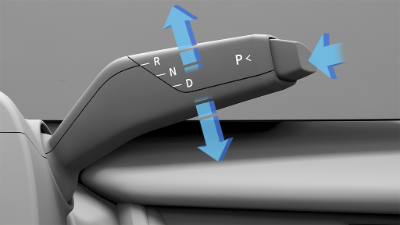
Right steering-column drive selector with R, N, D, and P markings
The Air does not have a conventional ignition button. Sit in the driver’s seat with your assigned access device and press the brake. Complete any PIN prompt using the PIN provided for your access. The charging cable must be disconnected before driving. Lucid starting instructions
With the vehicle stopped and the brake pressed, use the right steering-column lever:
Check the selected gear on the display. Confirm P before getting out; do not rely on automatic Park. Lucid drive selector